Everyday moments become mini vlogs.
Shoot a few seconds of your day, then stitch them into a vlog right on your phone.
No timeline editing · Automatic order · Real MP4 export
Real CocoCut diary clips · playing in sequence
“Most video apps ask me to sign up right away. This one only saves to my phone, so I can film my plain, everyday life without worrying.”
App Store · Japan
“I've been using it to record my life lately, and I really like it.”
App Store · Japan
“I use it every day to record my life. I've already made a few mini vlogs.”
App Store · Japan
Excerpts from App Store reviews in Japan, translated.
Seven moments. One short film.
Seven sample clips, from 12:50 to 20:58. CocoCut lines them up by the time they were shot and stitches them into one vlog. No timeline, no dragging.

12:50

13:32

15:06

15:22

18:26

19:44

20:58
21-second vlogReal MP4 · up to 4K · saved to Photos
Sample clips that ship with CocoCut. Hover a clip to play it.
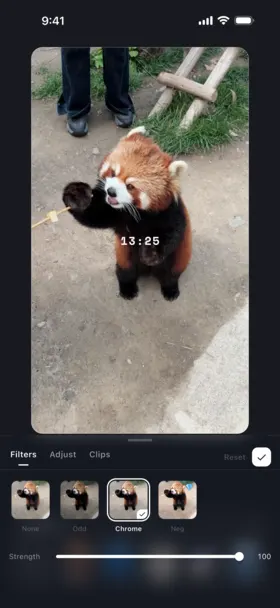
Stitched by itself. Styled by you.
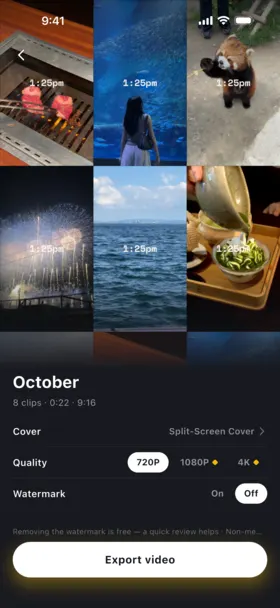
Split screens, film looks, and a cover that lays itself out, all on your phone.
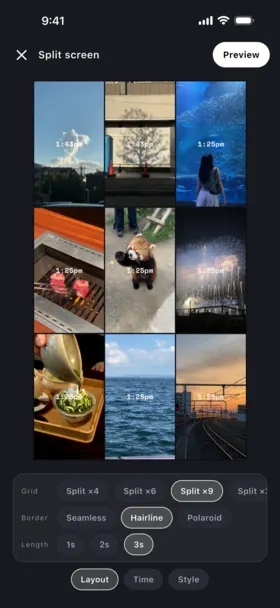
Nine moments. One frame.
Pick 2, 3, 4, 6, or 9 panels. More clips than panels? CocoCut spreads them out evenly.
Your days. Your phone.
A video diary holds the most private footage you own. Your clips and films stay on your phone and are never uploaded to a server.
Stored on your device
Clips live in the app. Finished films are saved to your Photos library.
No account
Open the app and start filming. There is nothing to sign up for.
No video servers
We don't run servers that store footage, so your videos are never uploaded to us.
Where your footage lives
- Clips
- In the app
- Finished films
- Photos library
- Account
- None
- Clips uploaded to servers
- None
Optional AI caption translation sends only the caption text.
Free to film every day. VIP when you want more.
The daily habit costs nothing. VIP lifts the limits on vlogs, export quality, and styles.
| Free$0 | CocoCut VIPMonthly, yearly, or lifetime | |
|---|---|---|
| Vlogs at once | 1 | Unlimited |
| Export quality | 720P + 2 HD exports | 1080P / 4K |
| Fixed clip length | 1s · 2s | 3–10s |
| Caption translation | On-device | AI |
| Fonts and filters | Basic | All |
| Your fonts and music in exports | Preview only | Included |
Long-press recording up to 10 seconds is free for everyone, and anyone can turn the film watermark off at export.
Questions, answered.
Everything you need to know about CocoCut's on-device privacy, pricing, and video journaling.
What is CocoCut?
CocoCut is a local-first daily video diary app for iOS and Android. Hold the shutter for a 1s or 2s clip (or long-press for up to 10 seconds), and CocoCut stitches your clips in date order into a mini vlog, with no timeline editing.
Are my personal video clips uploaded to cloud servers?
Never. CocoCut operates on an on-device local storage architecture. All your recorded video footage and rendered movies stay on your phone and native photo album. We do not operate video storage servers and no account registration is required.
Is CocoCut free to use?
Yes, the core is free: 1s/2s capture, long-press clips up to 10 seconds, automatic chronological stitching, date stickers, and 720P export. 1080P and 4K share 2 free exports for non-members. Anyone can turn the watermark off for free, for that export. CocoCut VIP is optional and adds 1080P/4K after those 2, adjustable 3–10s durations, and unlimited Vlogs.
How is CocoCut different from 1 Second Everyday (1SE)?
CocoCut is built around on-device privacy: clips and films stay on your phone and photo album, with no account required. It runs on both iOS and Android, exports 720P on the free tier (1080P and 4K share 2 free exports), and lets every user remove the watermark for free.

Capture your days to make life feel longer
Free on iOS and Android. No account needed.